为你的网站开启ssl支持
前几天再Startssl已经为我的博客申请的证书通过,今天早上学习了RSA加密原理,趁着热乎劲还没过,下午就把本站全部升级为https啦!
看到这个https,瞬间觉得高大上了许多。大家可能认为为自己的网站开启ssl功能很麻烦,其实不然。下面老高就简单的介绍一下开启的步骤,自己也做个记录。
不同的服务器配置ssl的方法大题思路相同,本文以nginx为例。
当然你还可以试试使用Let's Encrypt -- 免费的https证书
前几天再Startssl已经为我的博客申请的证书通过,今天早上学习了RSA加密原理,趁着热乎劲还没过,下午就把本站全部升级为https啦!
看到这个https,瞬间觉得高大上了许多。大家可能认为为自己的网站开启ssl功能很麻烦,其实不然。下面老高就简单的介绍一下开启的步骤,自己也做个记录。
不同的服务器配置ssl的方法大题思路相同,本文以nginx为例。
当然你还可以试试使用Let's Encrypt -- 免费的https证书
博客的文章渐渐多了起来,之前随意的分类就需要好好想整理一下。
为了图方便,直接在数据库里做了替换查询,不料typecho和WP一样,都会在metas表里存着分类和tag的统计信息,统计了这个分类下有多少篇文章,这个统计信息显示在分类和TAG管理页面。
也就是说,如果正常再文章编辑里修改分类并保存,统计信息会走一加一减这个过程,而暴力数据库修改不会触发。
而这种混乱导致老高的瞬间变身不搞不舒服斯基,下面我们一步一步来修复这个统计信息。
首先,找到所有分类(标签同理)
SELECT mid FROM typecho_metas AS m WHERE m.type = 'category';
然后,找到分类关系表,统计文章数
SELECT r.mid,
       count(cid)
FROM typecho_relationships as r
WHERE r.mid IN
    (SELECT mid
     FROM typecho_metas AS m
     WHERE m.type='category')
GROUP BY r.mid;
再次,我们提取出分类名称
SELECT r.mid,
       m.name,
       count(cid)
FROM typecho_relationships as r
LEFT JOIN typecho_metas as m ON m.mid=r.mid
WHERE r.mid IN
    (SELECT mid
     FROM typecho_metas AS m
     WHERE m.type='category')
GROUP BY r.mid;
最后,以上一个查询为基础修改原始表metas
UPDATE typecho_metas,
  (SELECT r.mid AS mid,
          count(cid) AS COUNT
   FROM typecho_relationships AS r
   WHERE r.mid IN
       (SELECT mid
        FROM typecho_metas AS m
        WHERE m.type='category')
   GROUP BY r.mid) AS tmp
SET typecho_metas.COUNT = tmp.COUNT
WHERE tmp.mid = typecho_metas.mid;
上面的SQL也表明了如果使用两张表跟新数据。
突然发现使用分类管理的合并到功能也可以,但是没我这个快 B)
先讲个笑话
我们程序员分两种,一种是:
if( #condition ){
    //codes
}
另一种是:
if( #condition )
{
    //codes
}
你是哪一种呢?
这个笑话比较冷,但是也说明了一个问题 —— 代码风格难以统一。
一个好的代码风格会使程序更容易阅读,提高团队合作的效率不说,自己看着也会赏心悦目,好像自己淫的一手好湿。
而混乱的代码轻则增加团队沟通成本,重则影响团队和谐。所以我认为不论是作为一个团队还是所谓一名开发者,必须坚持自己的程序编写风格。老高偶尔也会因为考虑到一致性而使用我不喜欢的代码风格,事实上这个行为是很不可取的。
所以今后老高今后要改正这个不良习惯,保持自己的代码风格,之前写的都不算 XD 。
下面老高精(HU)心(LUAN)整理了一些PHP编码的习惯,不知道有没有和我一样的TX?
编码推荐UTF-8,所以在处理文字长度的时候请使用mb_*系列函数。
由于UNIX/Linux、Mac与Windows在换行格式上的差别,请搞清楚运行环境, 再搞清楚CR(carriage return, 符号’r’表示, 十进制ASCII代码是13, 十六进制代码为0x0D), LF(line feed,使用’n’符号表示, ASCII代码是10, 十六制为0x0A), CR/LF的概念,然后在编辑器中把换行格式改为对应的格式即可。
| 系统 | 换行编码 | 正则 |
|---|---|---|
| UNIX/Linux | 换行 | \r |
| Mac | 回车 | \n |
| Windows | 回车+换行 | \r\n |
换行回车的历史,来自豆瓣
在计算机还没有出现之前,有一种叫做电传打字机(Teletype Model 33)的玩意,每秒钟可以打10个字符。但是它有一个问题,就是打完一行换行的时候,要用去0.2秒,正好可以打两个字符。要是在这0.2秒里面,又有新的字符传过来,那么这个字符将丢失。
于是,研制人员想了个办法解决这个问题,就是在每行后面加两个表示结束的字符。一个叫做“回车”,告诉打字机把打印头定位在左边界;另一个叫做“换行”,告诉打字机把纸向下移一行。
这就是“换行”和“回车”的来历,从它们的英语名字上也可以看出一二。
后来,计算机发明了,这两个概念也就被般到了计算机上。那时,存储器很贵,一些科学家认为在每行结尾加两个字符太浪费了,加一个就可以。于是,就出现了分歧。
Unix系统里,每行结尾只有“<换行>”,即“\n”;Windows系统里面,每行结尾是“<回车><换行>”,即“\r\n”;Mac系统里,每行结尾是“<回车>”。一个直接后果是,Unix/Mac系统下的文件在Windows里打开的话,所有文字会变成一行;而Windows里的文件在Unix/Mac下打开的话,在每行的结尾可能会多出一个^M符号。
注释是为了程序更好理解,所以老高一般会把注释写在需要注释的代码之前,例:
function abc(){
    //先验证权限
    authorized();
}
而有些注释只是想说明执行结果,那么我会把它们放在代码的下一行:
echo date("M d Y H:i:s", mktime (0,0,0,1,1,2000));
//Jan 01 2000 00:00:00
=号=号一般用在赋值和比较,我会在=号链接的逻辑两边各加一个space,同理适用于||、&&等逻辑运算,其他比较符号不管,例:
$a = array('I', 'Love', 'U');
if( count($b) == 0 )
{
    if( $a>=0 )
    {
        //code
    }
}
这里不多说了,多少一个shift的事儿。
if后直接跟(,$condition左右会有一个空格,而其他的函数则可以不加空格:
if( $a>0 )
{
    $number = strlen('abcde');
    echo 'positive!';
}
代码块其实就是{和}包裹的内容,用在if,switch,while等条件或分支的时候会用到,老高的建议是每个{和}必须独占一行。
?>这个标记是PHP代码闭合的格式,如果正在写一个纯PHP文件,请移除最后的?>,然后保持最后一行是空行。
定义函数参数的时候,如果有多个参数,除了第一个参数,其他参数之前必须加一个space,例:
json_decode($html, true);

function A($a, $b, $c)
{
    //code
}
除非你是高手。。。。。。否则可能会出现意想不到的效果。
$a = $b = 1;
$a = 2;
echo $b;

$a = $b = new DateTime;
$a->setDate(2001, 2, 3);
echo $b->format('Y-m-d');
list($a,$b)=array(10,20);
善用初始化方法和常量。
适当换行,例:
if( $a = 'a' ||
    $b = 'b' ||
    $c = 'c')
{
    //code
}
除非你的英文很差或者有特殊要求。
请一定使用全角符号,而且不要忘了结尾的句号。
github上的代码如果用到了,请务必标明出处,表要以为开源就是免费午餐,小心你也会吃上官司!你又不是小米公司,就算fork了改了又吃了官司,人家也不怕。
多数源代码都是基于某种协议开放的,这里给出几个关键词:[GPL、APACHE、BSD、LGPL] + Licenses,协议还有版本之分。
推荐模板:
XXX的诞生离不开很多非常棒的开源项目,包括: xxx,xxx,xxx.
用四个空格缩进,这样不会引起格式的混乱,保证了代码在各IDE里视觉统一,Python同样适用。
代码风格因人而异,如果你还没有悟出自己的风格,那就速度为自己整一个吧!
在此分享一个来自PHPCMS的编码规则,值得参考
今天给老娘的Mi2S刷机,研究了一下在mac上刷机的方法,在此记录一下。
PS.本方法适用于所有Android机器
安装Android File Transfer
brew cask install android-file-transfer
要在OSX上管理Android手机上的文件,需要下载安装这个官方工具http://www.android.com/filetransfer/
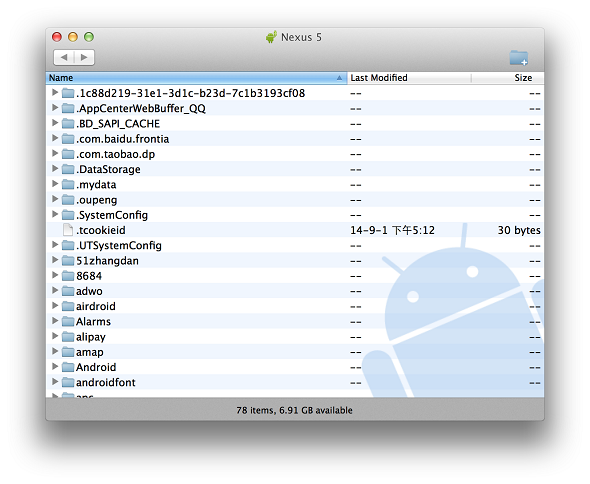
由于某些特殊原因网站打不开不要紧,不会翻墙的TX可以到我的网盘下载到目前最新的Android File Transfer。
下载安装完成后运行,就可以轻松管理手机文件了,这个时候把下载好的ROM拷贝到手机目录下,再进入recovery刷机了。
安装adb工具
brew cask install android-platform-tools
接下来再terminal中运行adb和fastboot即可开始刷机

**小提示:**刷机用到的命令可以参考博主的这篇文章adb,fastboot常用命令及刷机技巧
部分参考来自:
This article is post on https://coderwall.com/p/ggmpfa
configure: error: xslt-config not found. Please reinstall the libxslt >= 1.1.0 distribution
yum -y install libxslt-devel
configure: error: Could not find net-snmp-config binary. Please check your net-snmp installation.
yum -y install net-snmp-devel
configure: error: Please reinstall readline - I cannot find readline.h
yum -y install readline-devel
configure: error: Cannot find pspell
yum -y install aspell-devel
checking for unixODBC support... configure: error: ODBC header file '/usr/include/sqlext.h' not found!
yum -y install unixODBC-devel
configure: error: Unable to detect ICU prefix or /usr/bin/icu-config failed. Please verify ICU install prefix and make sure icu-config works.
yum -y install libicu-devel
configure: error: utf8mime2text() has new signature, but U8TCANONICAL is missing. This should not happen. Check config.log for additional information.
yum -y install libc-client-devel
configure: error: freetype.h not found.
yum -y install freetype-devel
configure: error: xpm.h not found.
yum -y install libXpm-devel
configure: error: png.h not found.
yum -y install libpng-devel
configure: error: vpx_codec.h not found.
yum -y install libvpx-devel
configure: error: Cannot find enchant
yum -y install enchant-devel
configure: error: Please reinstall the libcurl distribution - easy.h should be in /include/curl/
yum -y install libcurl-devel
LAOGAO added 20140907:
configure: error: mcrypt.h not found. Please reinstall libmcrypt.
wget ftp://mcrypt.hellug.gr/pub/crypto/mcrypt/libmcrypt/libmcrypt-2.5.7.tar.gz
tar zxf libmcrypt-2.5.7.tar.gz
cd libmcrypt-2.5.7
./configure
make && make install
added 20141003:
Cannot find imap
ln -s /usr/lib64/libc-client.so /usr/lib/libc-client.so
configure: error: utf8_mime2text() has new signature, but U8T_CANONICAL is missing.
yum -y install libc-client-devel
Cannot find ldap.h
yum -y install openldap
yum -y install openldap-devel
configure: error: Cannot find ldap libraries in /usr/lib
cp -frp /usr/lib64/libldap* /usr/lib/
configure: error: Cannot find libpq-fe.h. Please specify correct PostgreSQL installation path
yum -y install postgresql-devel
configure: error: Please reinstall the lib curl distribution
yum -y install curl-devel
configure: error: Could not find net-snmp-config binary. Please check your net-snmp installation.
yum -y install net-snmp-devel
configure: error: xslt-config not found. Please reinstall the libxslt >= 1.1.0 distribution
yum -y install libxslt-devel
checking for BZip2 support… yes checking for BZip2 in default path… not found configure: error: Please reinstall the BZip2 distribution
Fix:
yum -y install bzip2-devel
checking for cURL support… yes checking if we should use cURL for url streams… no checking for cURL in default path… not found configure: error: Please reinstall the libcurl distribution – easy.h should be in/include/curl/
Fix:
yum -y install curl-devel
checking for curl_multi_strerror in -lcurl… yes checking for QDBM support… no checking for GDBM support… no checking for NDBM support… no configure: error: DBA: Could not find necessary header file(s).
Fix:
yum -y install db4-devel
checking for fabsf… yes checking for floorf… yes configure: error: jpeglib.h not found.
Fix:
yum -y install libjpeg-devel
checking for fabsf… yes checking for floorf… yes checking for jpeg_read_header in -ljpeg… yes configure: error: png.h not found.
Fix:
yum -y install libpng-devel
checking for png_write_image in -lpng… yes If configure fails try –with-xpm-dir=
configure: error: freetype.h not found. Fix:
Reconfigure your PHP with the following option. --with-xpm-dir=/usr
checking for png_write_image in -lpng… yes configure: error: libXpm.(a|so) not found.
Fix:
yum -y install libXpm-devel
checking for bind_textdomain_codeset in -lc… yes checking for GNU MP support… yes configure: error: Unable to locate gmp.h
Fix:
yum -y install gmp-devel
checking for utf8_mime2text signature… new checking for U8T_DECOMPOSE… configure: error: utf8_mime2text() has new signature, but U8T_CANONICAL is missing. This should not happen. Check config.log for additional information.
Fix:
yum -y install libc-client-devel
checking for LDAP support… yes, shared checking for LDAP Cyrus SASL support… yes configure: error: Cannot find ldap.h
Fix:
yum -y install openldap-devel
checking for mysql_set_character_set in -lmysqlclient… yes checking for mysql_stmt_next_result in -lmysqlclient… no checking for Oracle Database OCI8 support… no checking for unixODBC support… configure: error: ODBC header file ‘/usr/include/sqlext.h’ not found!
Fix:
yum -y install unixODBC-devel
checking for PostgreSQL support for PDO… yes, shared checking for pg_config… not found configure: error: Cannot find libpq-fe.h. Please specify correct PostgreSQL installation path
Fix:
yum -y install postgresql-devel
checking for sqlite 3 support for PDO… yes, shared checking for PDO includes… (cached) /usr/local/src/php-5.3.7/ext checking for sqlite3 files in default path… not found configure: error: Please reinstall the sqlite3 distribution
Fix:
yum -y install sqlite-devel
checking for utsname.domainname… yes checking for PSPELL support… yes configure: error: Cannot find pspell
Fix:
yum -y install aspell-devel
checking whether to enable UCD SNMP hack… yes checking for default_store.h… no
checking for kstat_read in -lkstat… no checking for snmp_parse_oid in -lsnmp… no checking for init_snmp in -lsnmp… no configure: error: SNMP sanity check failed. Please check config.log for more information.
Fix:
yum -y install net-snmp-devel
checking whether to enable XMLWriter support… yes, shared checking for xml2-config path… (cached) /usr/bin/xml2-config checking whether libxml build works… (cached) yes checking for XSL support… yes, shared configure: error: xslt-config not found. Please reinstall the libxslt >= 1.1.0 distribution
Fix:
yum -y install libxslt-devel
configure: error: xml2-config not found. Please check your libxml2 installation.
Fix:
yum -y install libxml2-devel
checking for PCRE headers location… configure: error: Could not find pcre.h in /usr
Fix:
yum -y install pcre-devel
configure: error: Cannot find MySQL header files under yes. Note that the MySQL client library is not bundled anymore!
Fix:
yum -y install mysql-devel
checking for unixODBC support… configure: error: ODBC header file ‘/usr/include/sqlext.h’ not found!
Fix:
yum -y install unixODBC-devel
checking for pg_config… not found configure: error: Cannot find libpq-fe.h. Please specify correct PostgreSQL installation path
Fix:
yum -y install postgresql-devel
configure: error: Cannot find pspell
Fix:
yum -y install pspell-devel
configure: error: Could not find net-snmp-config binary. Please check your net-snmp installation.
Fix:
yum -y install net-snmp-devel
configure: error: xslt-config not found. Please reinstall the libxslt >= 1.1.0 distribution
Fix:
yum -y install libxslt-devel